
Screenshots
App details
- Version
- 3.9.3
- Size
- 5.90 MB
- Updated
- August 4, 2005
- Requires
- Windows ME
- Language
- English
- License
- Free
- Developer
- V3fax
- Category
- Windows OS
SoftPas in:
This product is also available in the following languages:
About CallCenter
Download CallCenter – Free Business Software for Windows, Call Management & Fax Tools
Overview: A Reliable Call Management Tool for Small Businesses
CallCenter is a free business software designed for Windows users seeking efficient call and fax management tools. Developed by V3fax, this application has been a trusted companion for small businesses and professionals since its initial release in 2005. Though it’s an older program, CallCenter continues to serve users in the United States, Canada, and Greece, where it remains popular for its straightforward functionality and minimal system requirements. Despite being last updated in 2005, the software still performs reliably on older systems, making it a viable option for users who rely on legacy hardware or prefer lightweight applications.
As part of the Business software category, specifically under Administration and Fax tools, CallCenter offers a streamlined interface focused on core communication tasks. It supports voice modems and enables users to manage incoming and outgoing calls, store call logs, and send/receive faxes—all within a single, easy-to-navigate environment. The software is especially useful for home offices, small call centers, or individuals needing a no-frills solution for managing telephony tasks without the complexity of modern platforms.
One of the standout features of CallCenter is its low resource consumption. At just a few megabytes in size, it requires far less storage and processing power than most modern business tools. This makes it ideal for users running Windows 95 or earlier operating systems, which are no longer supported by many current applications. For those maintaining older machines for specific tasks, CallCenter provides a secure and stable alternative. Its continued popularity—over 92,000 installations and steady weekly usage—speaks to its enduring utility, even in today’s fast-evolving tech landscape.
Key Features and Functional Benefits of CallCenter
CallCenter delivers a focused set of tools tailored to users who need efficient call and fax handling without unnecessary bells and whistles. The software is particularly effective for those managing telephony tasks through a voice modem, offering a suite of features that enhance communication workflow. One of its core capabilities is automatic call logging, which records incoming and outgoing calls with timestamps, caller ID, and duration—perfect for tracking business interactions and billing purposes.
Another essential feature is fax management. Users can send and receive faxes directly from the application, with support for both manual and automated faxing. The software integrates with standard fax modems, allowing seamless transmission of documents without requiring additional third-party software. This is especially valuable for small businesses that still rely on fax-based communication for legal or administrative purposes.
CallCenter also includes a built-in answering machine function, enabling users to record messages when they’re unavailable. These messages can be saved, reviewed, and even converted to audio files for archiving. The interface is designed for ease of use, with clearly labeled buttons and intuitive navigation, ensuring that even non-technical users can operate it effectively.
Additional features include customizable call alerts, support for multiple phone lines (if available), and the ability to import/export contact lists. While it lacks modern integrations like cloud storage or mobile access, its simplicity is its strength. For users who prioritize reliability over advanced features, CallCenter remains a solid choice. It’s also worth noting that the software is free to download and use, with no hidden fees or subscription models—making it an attractive option for budget-conscious businesses.
Installation, Usage, and Compatibility Details
Installing CallCenter is a straightforward process, especially for users familiar with older Windows systems. Since it’s designed for Windows 95 and earlier versions, the installation procedure is simple and does not require modern setup wizards. Users can download the installer from the official V3fax website, run the executable file, and follow the on-screen prompts. The entire process takes just a few minutes and requires minimal disk space—typically under 5 MB.
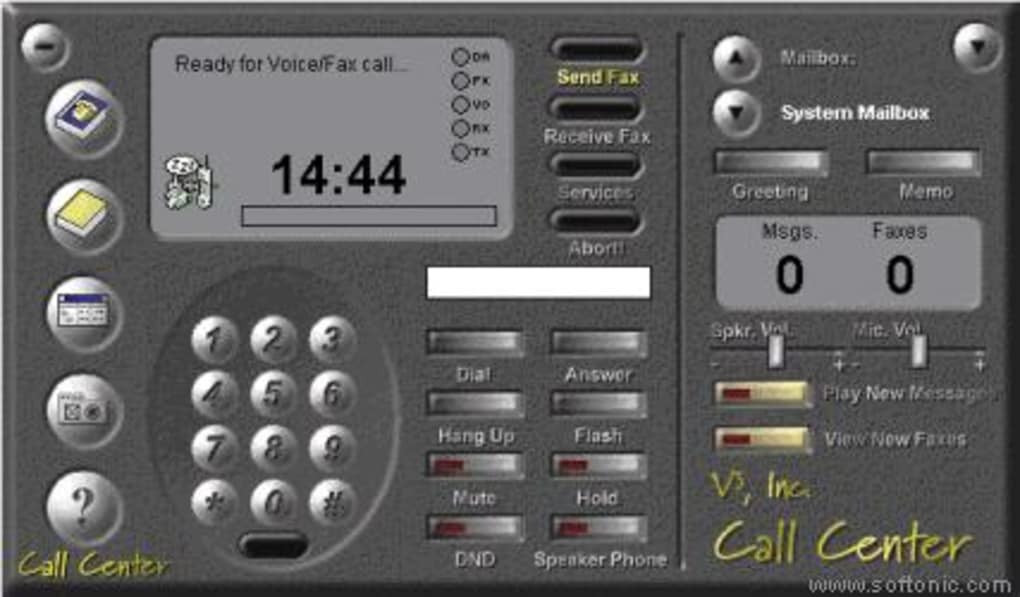
After installation, launching the application opens a clean, no-frills interface with clearly labeled sections for calls, faxes, and messages. Users must ensure their computer is equipped with a compatible voice modem, as CallCenter relies on hardware for call and fax functionality. Most standard modems from the late 1990s and early 2000s are supported, but users should verify compatibility before installation.
Usage is intuitive: to make a call, simply enter the number and click “Dial.” Incoming calls trigger an alert, and users can answer, reject, or forward them. For faxing, users can select a document, choose the recipient number, and initiate transmission. The software also allows users to schedule faxes for later delivery, which is helpful for time-sensitive documents.
Compatibility is limited to older systems—Windows 95, 98, ME, and possibly older versions of Windows NT. It does not support Windows XP or later, which may be a barrier for modern users. However, for those working on legacy systems or maintaining older office equipment, CallCenter remains a functional and secure option. It’s also important to note that due to its age, the software may not be compatible with newer hardware or drivers, so users should test it on their specific setup before relying on it for critical tasks.
Pros and Cons: Is CallCenter Right for You?
- Pros:
- Completely free to download and use
- Extremely lightweight—requires minimal system resources
- Excellent for users on older Windows systems (95, 98, ME)
- Integrated call logging and fax management
- Simple, intuitive interface for non-technical users
- Secure and stable with no ads or malware
- Cons:
- Not compatible with Windows XP or later
- Last updated in 2005—no recent bug fixes or security patches
- Lacks modern features like cloud sync, mobile access, or VoIP support
- Requires a compatible voice modem for full functionality
- No official technical support or community forums
Frequently Asked Questions (FAQ)
Is CallCenter free to download and use?
Yes, CallCenter is completely free to download and use. There are no subscription fees, hidden charges, or trial periods. It’s distributed as open-access software by V3fax, making it ideal for budget-conscious users and small businesses.
What operating systems does CallCenter support?
CallCenter is designed for Windows 95 and earlier versions, including Windows 98, ME, and some older Windows NT systems. It is not compatible with Windows XP, Vista, 7, 8, 10, or 11.
Do I need a voice modem to use CallCenter?
Yes, CallCenter requires a compatible voice modem to handle calls and fax transmissions. Standard fax modems from the late 1990s and early 2000s are typically supported.
Can I use CallCenter on modern Windows systems?
While it’s technically possible to run CallCenter on modern Windows systems using compatibility modes or virtual machines, it is not officially supported. For best results, use it on Windows 95 or earlier systems.
Is CallCenter secure for business use?
Yes, CallCenter is considered secure for its intended use. It has no known malware, ads, or tracking. However, due to its age and lack of updates, it should not be used for highly sensitive data on unsecured networks.
Final Verdict: A Niche but Functional Tool for Legacy Users
CallCenter remains a unique piece of software that serves a specific niche: users on older Windows systems who need reliable call and fax management. While it lacks modern features and hasn’t been updated in nearly two decades, its lightweight design, free access, and proven stability make it a valuable tool for legacy environments. If you’re running Windows 95 or 98 and rely on fax or call logging, CallCenter is worth downloading.
For most modern users, however, newer alternatives with cloud integration, mobile access, and VoIP support are more suitable. But for those maintaining older systems or seeking a no-nonsense tool, CallCenter delivers exactly what it promises—simple, secure, and free communication management.
Download CallCenter today and experience a reliable, lightweight business tool that’s stood the test of time.
Guides & Tutorials
How to install CallCenter
- Click the Download button above.
- Once redirected, accept the terms and click Install.
- Wait for the CallCenter download to finish on your device.
How to use CallCenter
This software is primarily used for its core features described above. Open the app after installation to explore its capabilities.
User Reviews
No reviews yet. Be the first to share your experience.
You may also like
more
Llama 2
Free-to-use large language model As the new addition to Meta’s arsenal of langua...

NotebookLM
Revolutionizing the note-taking and idea-generation process NotebookLM is an exp...

Github co pilot
AI-inspired software development and coding platform GitHub Copilot is a browser...

Google Gemma
Google’s lightweight AI models Introducing Google Gemma , a family of cutting-ed...

AI Image Enlarger
A free app for Windows, by ai-image-larger. AI Image Enlarger is a free software...

DALL E
AI-driven text-to-image transformation engine DALL·E is a free graphic and desig...